The Complete Google Merchant Center Optimisation Guide for 2026
Google Merchant Center / Ecommerce SEO / Shopping Growth
The Complete Google Merchant Center Optimisation Guide for 2026
Merchant Center is no longer just a product feed. It is now one of the most important ecommerce control rooms for Google Shopping, free listings, Performance Max, YouTube product discovery, brand visibility and AI-driven shopping experiences.
TL;DR
If your Merchant Center is weak, your ecommerce performance is capped. Google relies on clean product data, strong images, accurate pricing, shipping, structured data, reviews, product videos, brand assets and policy trust signals to decide where and how your products appear.
The winning brands in 2026 will not treat Merchant Center as an upload tool. They will treat it as a product visibility engine.
FeedProduct accuracy and eligibility
MediaImages, video and brand assets
TrustReviews, shipping and policies
Table of Contents
01What Merchant Center Does
02Product Feed Optimisation
03Product Images
04YouTube Product Videos
05Brand Profile
06Reviews & Ratings
07Product Studio & AI Assets
08Shipping, Returns & Trust
09Merchant Promotions
10Diagnostics & Fixes
11Performance Max
12AI Shopping Future
13Shopify & WooCommerce
14Audit Checklist
1. What Google Merchant Center Actually Does
Google Merchant Center is the place where your ecommerce product information becomes usable across Google. Your product titles, descriptions, prices, availability, images, shipping, promotions, reviews, videos and brand assets can all influence how Google understands and displays your store.
Google says its product data specification is used to format product information so Merchant Center can match products to the right queries. That means your feed is not admin work. It is search visibility work.
Merchant Center can support Shopping ads, Performance Max, free listings, product detail surfaces, YouTube shopping experiences, brand profile visibility and future AI-led shopping journeys. If you want the bigger picture of how this fits into a wider growth engine, see our guide on what a global performance marketing agency actually does for ecommerce brands.
The mistake most stores make
They connect Shopify or WooCommerce, see products approved, then stop. Approval is not optimisation. A product can be approved and still be poorly positioned, badly described, missing media, missing reviews, missing variants, missing GTINs and weak against competitors.
- Approval gets you eligible.
- Optimisation gets you competitive.
- Trust signals help customers choose you.
2. Product Feed Optimisation: The Foundation
Your feed is the language you use to explain your catalogue to Google. If your feed is thin, generic, duplicated or inconsistent with your website, Google has less confidence in your products.
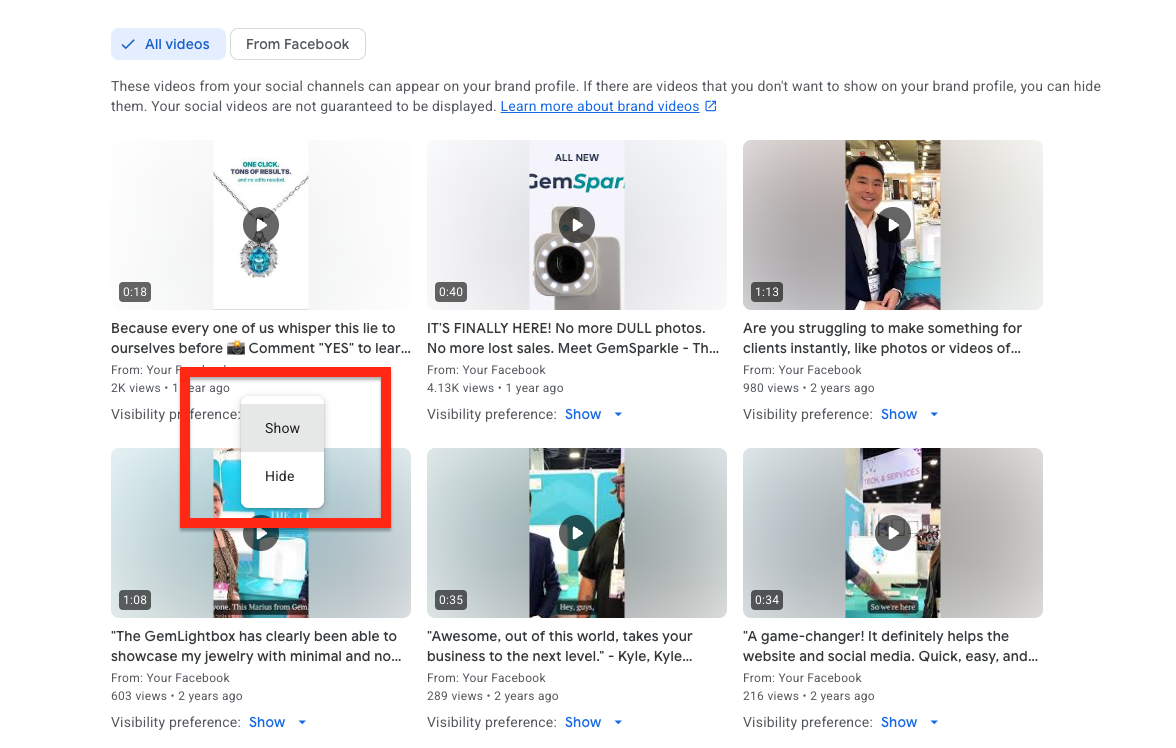
| Feed Area | Weak Example | Better Example | Why It Matters |
|---|---|---|---|
| Product Title | Dash Cam | Uniden Dash View 60R 4K Front & Rear Dash Cam with GPS and WiFi | Google and shoppers need model, feature and product type clarity. |
| Description | Great quality dash cam for your car. | Clear product description covering resolution, recording angle, GPS, app control, parking mode, warranty and ideal use case. | Descriptions help relevance, conversion and product understanding. |
| GTIN / MPN | Missing | Correct GTIN and manufacturer part number | Identifiers help Google match your product to the correct commercial graph. |
| Brand | Not supplied | Uniden | Brand clarity supports trust and product matching. |
| Category | Electronics | Vehicles & Parts > Vehicle Electronics > Dash Cameras | Better categorisation improves product context. |
| Availability | Mismatch with website | Accurate stock status synced frequently | Mismatches can damage eligibility and user trust. |
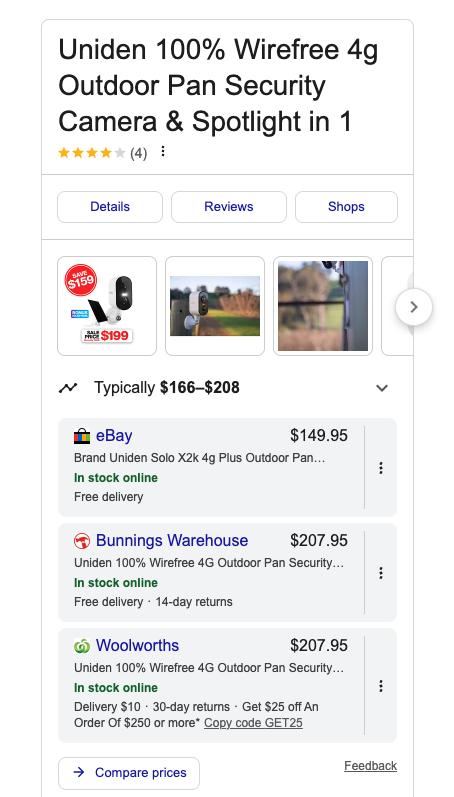
Best-practice product title formula
Brand + Product Name + Model + Core Feature + Product Type + Use Case
Example: Uniden XTRAK 80 Pro UHF CB Radio with Bluetooth, GPS and App Control for 4WD Touring
Must-have attributes
Title, description, link, image link, price, availability, brand, GTIN or MPN, condition and Google product category.
Conversion attributes
Sale price, promotions, product highlights, additional images, shipping, returns, ratings and video assets.
Advanced attributes
Supplemental feed data, custom labels, item group ID, variant options, product detail attributes and conversational attributes where available.
3. Product Images: Your First Conversion Asset
Product images do more than make a listing look good. They help users understand size, material, use case, packaging, installation and value. Google Shopping is visual by nature, and weak images make strong products look average.
Image assets to upload
- Clean main product image on a white or simple background.
- Multiple angles of the product.
- Lifestyle image showing the product in use.
- Scale image showing size and context.
- Feature callout image.
- Bundle image showing everything included.
- Installation or setup image if relevant.
WordPress image rules
Upload your images to the WordPress Media Library, not as random external files. Rename files before upload, compress them, use WebP where possible, write descriptive alt text and add captions when the image explains a process.
Example filename: google-merchant-center-product-video-linking.webp
Example alt: Merchant Center product video linking screen for ecommerce products.
4. YouTube Product Videos in Merchant Center
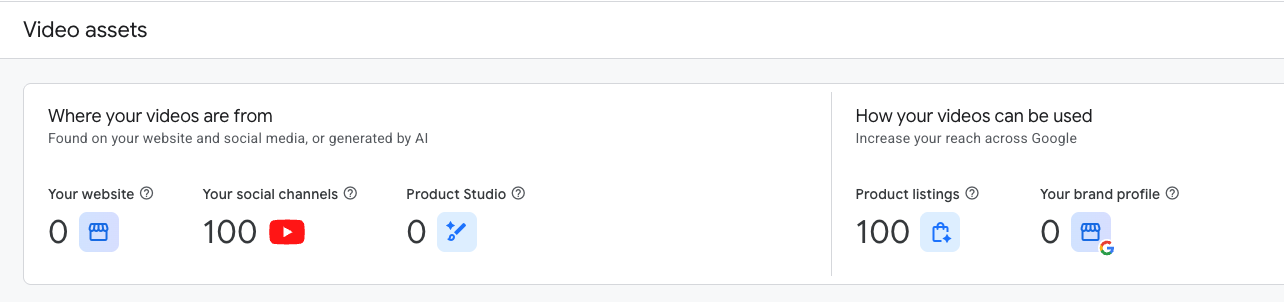
Google’s Video assets area in Merchant Center is designed to help merchants view, manage and distribute video content across Google advertising and organic surfaces. Google also states that the area can help merchants use video in marketing efforts on Google.
This matters because videos give Google and customers more context than a static image can. A video can show the product in use, explain installation, compare models, prove quality and remove purchase hesitation.
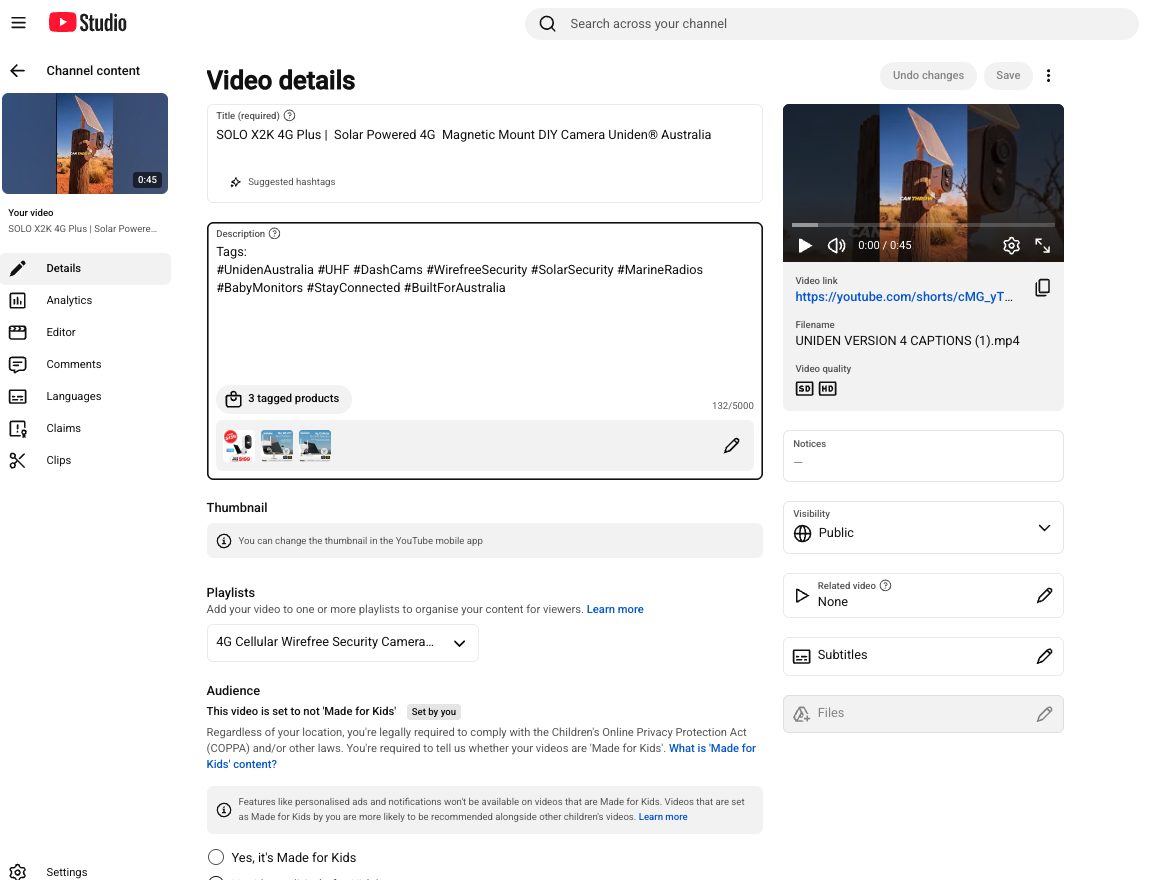
| Video Type | Best For | Recommended Content |
|---|---|---|
| Product demonstration | Most ecommerce products | Show the product, core features, how it works and who it is for. |
| Installation guide | Technical products | Show setup steps, tools required, common mistakes and final result. |
| Comparison video | Products with similar models | Compare model differences, use cases, price points and buyer fit. |
| Unboxing | Bundles and premium products | Show packaging, inclusions, accessories and first impressions. |
| Shorts | Fast product discovery | One feature, one benefit, one clear call to action. |
Do not upload generic brand videos against every product. Match the video to the specific product, model, bundle or category. Relevance is the whole point. For a deeper look at this specific tactic, read our guide on linking YouTube videos to products in Merchant Center.
5. Brand Profile: Your Ecommerce Trust Layer
Brand Profiles are another sign that Google wants more than product data. Google’s Brand Profile help explains that merchants can manage images and videos on the brand profile and choose which assets may be shown. Google Ads announcements also point to brand management tools in Merchant Center across Google and YouTube.
For ecommerce stores, the Brand Profile is where your brand story, media, imagery, logo, videos, policies and trust signals can support discovery. It is not the same as a local Google Business Profile. It is more focused on ecommerce brand presence. For a full breakdown, see our guide on Google Merchant Center Brand Profiles explained.
Brand Profile checklist
- Upload current logo assets.
- Add strong brand imagery.
- Use approved product and lifestyle videos.
- Check business information.
- Review shipping and return visibility.
- Connect social and web assets where supported.
- Remove weak or outdated imagery if it appears.
6. Reviews, Ratings and Seller Trust
Price matters, but trust often closes the sale. Merchant Center optimisation should include product reviews, seller ratings, website reviews, return policy clarity and structured review markup where appropriate.
Product reviews
Best for products where shoppers compare quality, features, reliability and satisfaction.
Seller ratings
Useful for building trust in delivery, service, support and post-purchase experience.
Review schema
Use structured data carefully and only where reviews are genuine, visible and compliant.
7. Product Studio and AI-Generated Assets
Google continues to build AI and creative tools into its shopping ecosystem. Product Studio and similar AI asset tools can help merchants improve visual assets, create lifestyle scenes and speed up creative production.
Use AI assets carefully. They should support accurate product representation, not mislead customers. Google has also introduced product data specification changes around AI-generated content disclosure, so ecommerce brands need to be disciplined when using generative AI in shopping assets.
Traditional rule still stands: show the actual product clearly first. AI-enhanced lifestyle images are a support act, not a replacement for clean, accurate product photography.
8. Shipping, Returns and Policy Trust
Shipping and returns are not boring settings. They are commercial trust signals. Customers want to know delivery cost, delivery speed, return options, warranty and support before they buy.
Google’s 2026 product data specification update includes new shipping attributes at product level, showing that delivery detail is becoming even more important inside product data.
- Make shipping cost clear.
- Show delivery timeframes.
- Keep Merchant Center shipping settings aligned with your website.
- Keep return policies clear and accessible.
- Use product-level shipping where needed for bulky, fragile, regional or premium products.
9. Merchant Promotions
Promotions can increase visibility and urgency in Shopping experiences. They are especially useful for seasonal sales, bundles, clearance, new product launches, free shipping thresholds and limited-time offers.
The key is to make the promotion clean, genuine and aligned across your website, feed, landing page and Merchant Center. A mismatch can create approval issues and poor customer experience.
Promotion examples
- Free shipping over a threshold.
- Limited-time launch discount.
- Bundle saving.
- Buy one, get one offer.
- Seasonal sale.
- Bonus accessory included.
10. Diagnostics: Where Money Leaks
Merchant Center diagnostics show where your product visibility is being limited. Do not treat diagnostics as a once-a-month admin check. For serious ecommerce stores, diagnostics should be reviewed constantly.
| Issue | Common Cause | Fix |
|---|---|---|
| Price mismatch | Feed price does not match landing page price. | Improve feed sync, check sale price rules and structured data. |
| Availability mismatch | Website says out of stock while feed says in stock, or vice versa. | Increase sync frequency and check variant availability. |
| Missing identifiers | No GTIN, MPN or brand for products that require them. | Add correct identifiers from manufacturer data. |
| Image issue | Low quality, overlay text, broken link or non-compliant image. | Replace with clean, high-quality product imagery. |
| Policy issue | Restricted claims, unsupported products or misleading landing page. | Review Google policies and correct claims. |
11. Performance Max Starts with Merchant Center
Performance Max can only perform with the assets and data it receives. If your feed is weak, titles are poor, images are average, videos are missing and categories are messy, you are asking automation to win with poor inputs.
Feed quality
Better titles, descriptions, identifiers and categories improve campaign context.
Asset quality
Images and videos shape the creative output customers actually see.
Segmentation
Custom labels help split best sellers, margin tiers, clearance, seasonal and hero products.
12. AI Shopping: Where This Is Heading
Google Shopping is becoming more conversational, visual and AI-assisted. Product feeds, videos, brand assets, reviews, policies, structured data and product content are all part of the information layer Google can use to understand your catalogue.
Google has also introduced conversational product data attributes including question and answer, document link, related product, item group title, variant option and popularity rank. That is a clear signal: product data is becoming deeper, more contextual and more answer-driven. This mirrors what we have already seen play out in AI Overview and ChatGPT Shopping traffic converting into real ecommerce revenue.
The future is not just ranking for keywords. It is being the product Google understands well enough to recommend when a shopper asks a complex buying question.
13. Shopify and WooCommerce Optimisation
For Shopify and WooCommerce stores, the biggest issue is assuming the plugin or app does the strategy. It usually handles the connection, not the competitive positioning.
Shopify priorities
- Clean product titles in Shopify.
- Unique product descriptions, not supplier copy.
- Variant names that make sense.
- Correct product type and category structure.
- Strong collection architecture.
- Accurate inventory and pricing sync.
- Product schema that matches the live page.
WooCommerce priorities
- Reliable feed plugin and scheduled sync.
- Correct attributes for brand, GTIN, MPN and variants.
- Fast product pages.
- Clean canonical URLs.
- Schema output checked for errors.
- Category and breadcrumb consistency.
- Image compression and naming discipline.
14. Google Merchant Center Audit Checklist
Use this checklist before scaling spend. It will expose feed, website, media, policy and trust issues before they cost you money.
Feed audit
- All hero products approved.
- No critical diagnostics ignored.
- Titles include brand, model and product type.
- Descriptions are unique and useful.
- GTINs and MPNs are present where available.
- Product categories are accurate.
- Variants use item group IDs correctly.
- Custom labels segment margin, priority and seasonality.
Website audit
- Product pages load fast on mobile.
- Prices match feed exactly.
- Availability matches feed exactly.
- Shipping and returns are visible.
- Product schema validates correctly.
- Reviews are visible and genuine.
- Images are compressed and named properly.
- Product videos are embedded where helpful.
Media audit
- Main images are clean and compliant.
- Additional images show use cases.
- Video assets are mapped to relevant products.
- YouTube titles include exact product models.
- Video descriptions link to product pages.
- Captions and chapters are added.
- Brand profile images are current.
- Outdated assets are removed or hidden.
Commercial audit
- Promotions are current and accurate.
- Free shipping thresholds are correct.
- Best sellers are prioritised.
- Low-margin products are segmented.
- Clearance products are labelled.
- Bundles have strong product imagery.
- Reviews support trust.
- Performance Max asset groups match product themes.
FAQs
What is Google Merchant Center optimisation?
It is the process of improving your product data, images, videos, brand profile, shipping settings, reviews, structured data and diagnostics so Google can better understand, approve and display your products.
Is Merchant Center only for paid Shopping ads?
No. Merchant Center can support paid Shopping placements, free listings, product visibility across Google surfaces and related brand and video experiences.
Do product titles matter in Merchant Center?
Yes. Product titles are one of the most important parts of your feed because they help Google and customers understand what the product is, who made it and what makes it relevant.
Should I add YouTube videos to products?
Yes, when the video is relevant to the specific product. Demonstration, installation, comparison and unboxing videos can improve trust and help Google understand the product more deeply.
Should I upload images to WordPress?
Yes. Upload them to the WordPress Media Library with clean filenames, compressed file sizes and descriptive alt text. Then place them inside the blog where the placeholders are.
What is a Brand Profile in Merchant Center?
It is a brand-facing presence connected to Merchant Center where images, videos and business information can help showcase your ecommerce brand across Google experiences.
How often should Merchant Center diagnostics be checked?
For active ecommerce stores, check diagnostics frequently, especially before campaigns, promotions, product launches and major sale periods.
What is the biggest Merchant Center mistake?
Treating product approval as success. Approval means the product can show. Optimisation determines whether it can compete.
Does Merchant Center affect Performance Max?
Yes. Performance Max campaigns that use product feeds rely heavily on Merchant Center data and assets. Better feed quality gives automation better inputs.
What should ecommerce brands do first?
Start with feed accuracy, diagnostics, product titles, images, pricing, availability, shipping and top-selling product pages. Then build videos, reviews, promotions and brand assets.
Final Word
Google Merchant Center has become a serious ecommerce growth system. The brands that win will not be the ones that simply connect a feed and hope. They will be the ones that maintain clean data, strong creative, sharp offers, genuine trust signals, useful videos and a brand profile that proves who they are.
In 2026, Merchant Center optimisation is not optional. It is part SEO, part paid media, part conversion rate optimisation and part brand infrastructure.
Product Feed SEOGoogle ShoppingMerchant Center NextPerformance MaxEcommerce Growth