How Linking YouTube Videos to Products in Google Merchant Center Can Increase Ecommerce Sales
Google Merchant Center • Product Video SEO
How Linking YouTube Videos to Products in Google Merchant Center Can Increase Ecommerce Sales
Google Shopping is no longer only a product feed, a price, a title and a few images. The serious ecommerce brands are now giving Google richer proof: product videos, demonstrations, installation walkthroughs, comparison content and real-world footage connected directly to the products they sell.
TL;DR: product video is becoming a feed asset, not just content
Google Merchant Center now gives ecommerce retailers a stronger way to manage video assets and connect videos to product offers. That matters because product discovery is becoming more visual, more AI-assisted and more trust-driven. A product video can help Google understand what the product is, how it works, what it looks like in real life and why a shopper should care.
The practical takeaway: if you sell products online, every high-value product should have a matching YouTube video, embedded on the product page, connected through Merchant Center where available, and optimised with the same model name, product title and key features used in your feed.
What is the YouTube product video feature in Google Merchant Center?
Inside Merchant Center, Google has been expanding creative tools so retailers can manage videos alongside product data. The Video assets area is designed to help merchants view, manage and distribute video content across Google advertising and organic surfaces. Google can aggregate videos from sources such as YouTube, social profiles, your website and Product Studio, then help identify products featured in those videos.
In simple language, this gives retailers a way to tell Google, “this video belongs with this product.” That is a big shift. Historically, product feeds were heavily text and image based. Now, video is becoming part of the product identity layer.
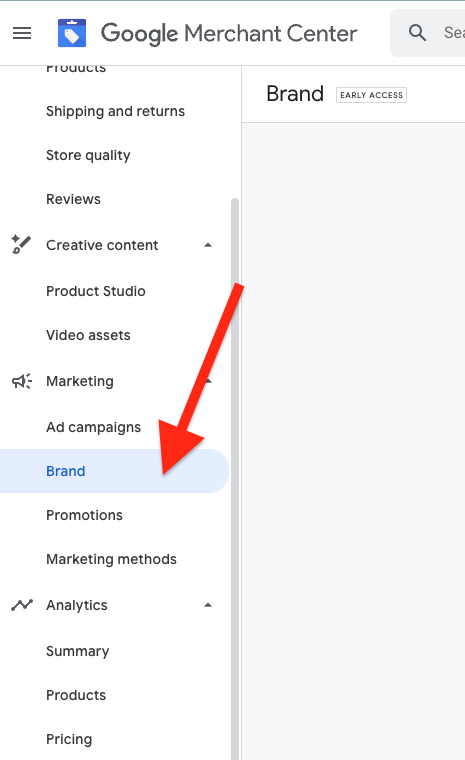
The feature does not replace your product feed. Your feed still needs strong titles, descriptions, GTINs, pricing, availability, shipping and product images. Video sits on top of that. It helps enrich the product story and can support stronger engagement across Google surfaces. To understand how this fits into the full Merchant Center picture, read our complete Google Merchant Center optimisation guide.
Why this matters for ecommerce brands
Most ecommerce brands have treated video as a social media asset. That is too narrow. Product video now needs to be treated as a commerce asset, a trust asset and a search asset.
It builds buyer confidence
Shoppers can see size, use, finish, features and real-world operation before buying.
It improves product context
Google gets more signals about the product beyond title, image and description.
It strengthens conversion intent
Video helps answer objections before the shopper reaches the checkout.
For technical, premium or considered-purchase products, video is not a nice extra. It can be the difference between confusion and confidence. If the customer needs to understand installation, use case, durability, comparison, performance or compatibility, a video usually explains it faster than a paragraph.
Where product videos can be used across Google
Google’s documentation explains that videos in Merchant Center can be used for product listings, brand profile experiences on Search and, when Google Ads is linked, video assets can sync into the Google Ads asset library. That means one good product video can potentially support multiple parts of the customer journey. A strong Brand Profile also makes use of your video assets — see how in our guide on Google Merchant Center Brand Profiles explained.
| Surface | How video can help | What to prepare |
|---|---|---|
| Free listings | Richer product presentation and stronger engagement signals. | Clear product demo videos matched to specific products. |
| Shopping experiences | Helps shoppers evaluate the product before clicking through. | Product-specific videos, not generic brand videos. |
| Brand Profile | Shows your brand as active, credible and content-rich. | Brand story videos, range videos and best-seller videos. |
| Google Ads asset library | Makes video easier to reuse in campaign creation. | Short, clean creative with strong product hooks. |
| Product pages | Improves dwell time and reduces purchase uncertainty. | Embed the same YouTube video on the matching product page. |
How Google AI can understand product videos
Google’s systems can use many signals to understand content: titles, descriptions, captions, visible text, audio, product imagery, landing pages, structured data and feed data. When your video clearly names the product, demonstrates the product and links back to the matching product page, you reduce ambiguity.
This is especially important for products with model numbers. A title like “Dash Cam Demo” is weak. A title like “Uniden iGO CAM 90R 4K Dash Cam: Road Test, Parking Mode and App Setup” gives Google and the customer a much clearer signal.
Rule: say the product name in the video, show the product clearly, include the model number in the YouTube title, add the product page URL in the description, and use chapters for key features.
SEO benefits of linking YouTube videos to products
This is not traditional SEO in the old sense of adding keywords and hoping for rankings. It is entity SEO. You are helping Google connect the same product across your website, Merchant Center, YouTube, Google Shopping and your wider brand ecosystem.
- Stronger product entity signals: the product name, model, images, video and URL all reinforce each other.
- Better long-tail visibility: videos can target practical queries such as “how to install”, “review”, “comparison”, “setup” and “best for”.
- More SERP real estate: your product page, video, Shopping listing and brand profile can all support the same product journey.
- Improved content depth: a product page with video, FAQs, specs and schema is usually stronger than a thin product page.
- AI search readiness: richer product content gives AI systems more context to use when answering product-led questions.
Google Shopping benefits
In Google Shopping, many products look the same. Similar image. Similar price. Similar title. Similar star rating. Video gives your listing a point of difference because it can prove what static content cannot.
For example, a security camera brand can show night vision footage. A dash cam brand can show real road footage. A UHF radio brand can show installation and range use. A jewellery brand can show sparkle, scale and finish under light. A furniture brand can show dimensions and room placement.
Before click
Video can help the shopper understand the product faster.
During consideration
Video answers questions that normally cause hesitation.
Before purchase
Video reduces doubt around features, size, setup and quality.
The best product videos to create first
Do not start with overproduced brand films. Start with videos that help people buy. The best product videos are practical, specific and tied to real objections.
| Video type | Best for | Why it works |
|---|---|---|
| Product demonstration | Most ecommerce products | Shows the product in use and removes uncertainty. |
| Installation or setup | Electronics, home, automotive, tools | Reduces fear that the product is hard to use. |
| Comparison video | Products with multiple models | Helps customers choose the right version. |
| Real-world test | Dash cams, cameras, outdoor gear | Proves performance in the environment the customer cares about. |
| Unboxing | Premium products and bundles | Shows what is included and improves perceived value. |
| FAQ video | Products with common objections | Answers customer questions before support is needed. |
Implementation checklist for ecommerce teams
Use this process for every priority product. Start with your best sellers, highest-margin products and products where customers often ask questions before buying.
- Choose the product or product group.
- Create a specific YouTube video for that product.
- Use the exact product title and model number in the video title.
- Add a clear YouTube description with the product page link.
- Add chapters for features, setup, comparison, warranty and FAQs.
- Upload captions or check that auto captions are accurate.
- Embed the video on the matching product page.
- Add VideoObject schema where appropriate.
- Check Merchant Center Video assets and confirm product mapping where available.
- Monitor product performance, click-through rate, conversion rate and assisted sales.
Should you upload images to WordPress?
Yes. Upload your blog images into the WordPress Media Library. Do not leave them sitting only on your desktop or pasted in from another source. WordPress-hosted images can be compressed, renamed, given alt text, reused across the site and indexed as part of your website.
Use filenames such as google-merchant-center-product-video-assets.jpg or youtube-product-video-google-shopping-example.webp. Avoid filenames like Screenshot 2026-07-06 at 8.14am.png. That gives search engines and your own team a cleaner structure.
- Use WebP where possible.
- Keep screenshots sharp and readable.
- Add descriptive alt text, not keyword stuffing.
- Use captions when the screenshot explains a process.
- Compress images before upload to protect page speed.
FAQs
Does linking a YouTube video to a product guarantee better rankings?
No. It is not a ranking guarantee. It is a stronger product content signal that can improve understanding, engagement and presentation across eligible Google surfaces.
Should every product have its own video?
Ideally, every important product should. At minimum, start with best sellers, high-margin products, technical products and products with high pre-purchase questions.
Can I use the same video for multiple products?
Yes, if the video genuinely features multiple products or a product family. However, product-specific videos are usually cleaner for matching and conversion.
Is YouTube better than uploading video directly to the website?
For Google ecosystem alignment, YouTube is powerful because it connects naturally with Google Search, Merchant Center and Google Ads. You can still embed the YouTube video on your product page.
What should ecommerce brands do first?
Create a video plan around commercial value. Prioritise products that already receive traffic but have room to improve conversion rate.
Final word
Google Merchant Center is moving from a product feed platform to a richer ecommerce intelligence layer. Brands that still treat Shopping as titles, prices and images will fall behind. Brands that connect product pages, feeds, YouTube videos, structured data and brand assets will give Google a much stronger reason to trust, understand and show their products.