Google Ads Channel Prioritisation: Budget Controls Explained
A practical guide to the new controls for Search, Shopping and Performance Max, with a clearer way to test partner traffic and protect campaign performance.
TL;DR
Set priorities around the outcomes your business needs. Use a modest allocation to test a secondary channel, then judge the result on qualified leads or profitable orders. The allocation is a best-effort limit, not a guaranteed spending cap.
More control over the next dollar
A campaign average can hide a problem. A service business might see its cost per lead fall while its sales team spends more time chasing enquiries that never become jobs. A retailer might report a strong return on ad spend while discounts and returns eat into the margin.
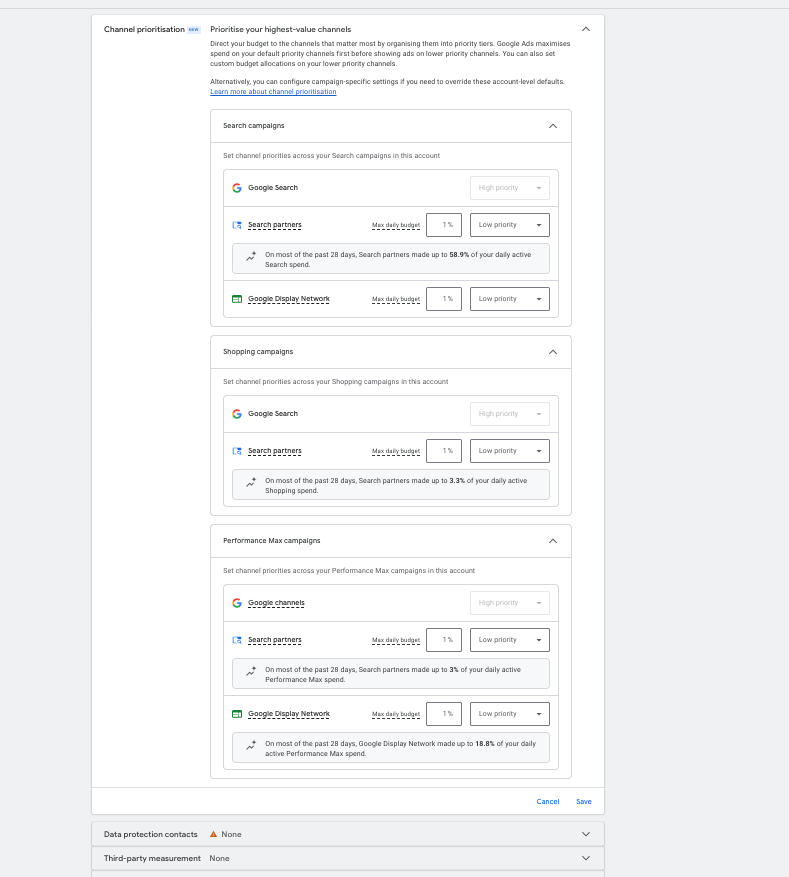
Channel prioritisation gives advertisers another way to respond. Google’s October 2026 announcement introduced High and Low priority tiers across Search, Shopping, Performance Max and Demand Gen. Higher-priority inventory is funded first, within applicable bidding targets. In Performance Max, Google surfaces are grouped together, rather than controlled individually. Read Google’s announcement.
The useful question is simple: which traffic sources deserve more room to grow, and what evidence would change that view?
Two settings with different jobs
Priority
Expresses the order in which eligible channels should receive spend. It does not promise more demand or better results.
Budget allocation
Sets an optional percentage for a Low priority channel. Google aims to stay within it, but daily spending can exceed that amount.
1,000 daily budget × 5% allocation = 50 per day
The percentage uses the campaign’s average daily budget, not its actual spend. The same arithmetic applies in your account currency. It is a planning limit, not an exact daily bill.
Demand Gen supports priorities but not percentage allocations. Availability varies during the rollout. Check the options shown in your account before planning a change. Google’s control definitions and eligibility.
Choose a starting point you can defend
There is no universal “best” split. The starting point should reflect your sales cycle, margins and the quality of the evidence you already have.
If lead quality is the problem
Compare contactable leads, qualified appointments and completed sales by source wherever your measurement supports it. Check the landing page and conversion action first. If every form submission is counted equally, a lower reported acquisition cost may reward the wrong outcome.
If profitable sales are the goal
Look beyond revenue ROAS. Compare contribution after product costs, discounts, fulfilment and returns. Separate acquisition from repeat purchasing when you can. A channel that looks efficient because it reaches existing customers may have a different role from one that introduces new buyers.
If the account has little reliable data
Start with a limited test you can afford to learn from. Define an acceptable cost per qualified outcome and a maximum test spend before changing settings. Avoid account-wide restrictions based on a handful of conversions.
Use the same decision process across markets, but assess each market on its own economics. Local demand, language, sales capacity, currency and seasonality can make a successful allocation in one country a poor starting point in another.
Make the test answer one question
- Write the hypothesis. For example: “A lower partner allocation will reduce unqualified enquiries without reducing completed sales.”
- Record a baseline. Save the current settings, budget, bidding target, conversion definitions and recent results. Include your usual conversion delay.
- Change one meaningful variable. Keep the offer, landing page and other campaign settings stable where practical. Record the date and exact change.
- Wait for outcomes to mature. A business with a long sales cycle cannot judge success from yesterday’s lead count. Choose a review window that reflects normal conversion lag and enough volume to make a useful comparison.
- Review the whole campaign. Check qualified outcomes, total spend, overall acquisition cost and lost volume. Decide whether to retain, loosen or reverse the setting.
Before-and-after comparisons can be affected by promotions, seasonality and competitor activity. Treat them as evidence, not proof of causation. Where a supported experiment fits the question, check its limitations before launch.
Read channel reports in context
Google’s channel performance report lets Performance Max and Demand Gen advertisers examine distribution, conversions and diagnostics. Use it to investigate changes, not simply to rank every channel on one headline metric. The “Conversions” and “Results” views include different sets of goals. How the channel report works.
Keep the reporting question precise. An attributed conversion tells you how the platform assigned credit; it does not by itself show what would have happened without that advertising. Check the account view against sales records and the business’s overall results.
Search advertisers: check the February 2027 change
Google says the existing Display Expansion allocation setup for Search campaigns will change from February 2027. Its guidance for retaining the current configuration is to set Google Display Network to Low priority with a 50% allocation. This is a migration setting, not a recommendation that every advertiser should spend half its budget on Display. Google’s transition notice.
Identify affected campaigns, document their present configuration and review performance before the change. Make the decision at campaign level before applying a broad default.
Common questions
Will Low priority switch a channel off?
No. Low priority can still receive spend. Google’s documentation says a 0% allocation prevents spending on that channel. Check whether the allocation control is supported for your campaign type.
Why might priorities barely change spending?
For target-based campaigns that are not budget-constrained, priorities generally have little effect on distribution. A Low priority channel’s budget allocation still applies. Check the bid strategy and budget status before assuming the setting has failed.
Can Performance Max get separate Search and YouTube budgets?
Not through this control. Google groups its own surfaces together for prioritisation. Do not confuse individual channels in a performance report with the groups available in the settings.
Should I change every campaign at once?
Usually start where the issue and evidence are clearest. An account-wide change makes it harder to understand which campaign caused the result. Check shared budgets and overrides before saving.
Technical answers: Google Ads Help. Product documentation reviewed 6 November 2026. Settings and rollout availability may change.
Start with the outcome. Then set the priority.
A cleaner channel split is only useful if it improves what the business receives. Agree on the measure, make a controlled change and keep the option to reverse it.